Images are one of the most shared types of content on Twitter, now known as X. Photographers share their work, designers post inspiration, and users upload memes, screenshots, and news visuals every day.
The problem is that when you try to save these images directly from Twitter, the quality is often reduced. Many users notice that downloaded photos look slightly blurry or compressed compared to the original post.
If you want to download Twitter images in original quality, you need to understand how Twitter handles images and which methods allow you to save the highest resolution version.
This guide explains how Twitter image downloading works, why compression happens, and the best ways to download Twitter images online without losing quality.
How Twitter Handles Image Compression and Quality
Before learning how to download Twitter images in original quality, it helps to understand how Twitter processes images.
When someone uploads a photo to Twitter, the platform automatically compresses and resizes the file. This is done to improve loading speed and reduce storage requirements.
Here is what usually happens during the upload process.
Image Processing
Twitter converts uploaded images into optimized formats. This reduces the file size so images load faster in timelines.
Multiple Image Sizes
Twitter stores several versions of the same image, such as:
- Thumbnail version
- Medium resolution version
- High resolution version
The version displayed in your feed is often not the highest resolution available.
Compression
Compression removes some image data to reduce file size. This can slightly reduce sharpness and detail.
This is why simply right clicking and saving an image often results in a lower quality version.
To get the best result, you need access to the highest resolution version stored by Twitter.
Different Methods to Download Twitter Images
There are several ways to download Twitter images. Some methods provide better quality than others.
Let’s look at the most common options.
Method 1: Saving the Image Directly (Maybe Not working on some devices or browsers)
The simplest method is saving the image directly from Twitter.
On desktop:
- Right click on the image
- Select Save image as
On mobile:
- Tap and hold the image
- Choose Save image
However, this often downloads a compressed version.
Method 2: Editing the Image URL (For Advanced Users)
Advanced users sometimes modify the image URL to request the highest resolution version.
For example, Twitter image links often include parameters that control image size.
Changing these parameters can retrieve a larger version of the image.
This method works but requires technical knowledge.
Method 3: Using an Online Twitter Image Downloader (Recommended)
The easiest method is using a twitter photo downloader.
These tools analyze the tweet link and extract the highest resolution image stored on Twitter.
Many users prefer this method because:
- It is simple
- It works on all devices
- It avoids manual URL editing
Step-by-Step Method Using an Online Downloader
One of the easiest ways to download Twitter images online is by using a browser based downloader.
Many online tools provide this feature. For example, websites like tweeterdownloader.com allow users to paste a tweet link and retrieve the original image.
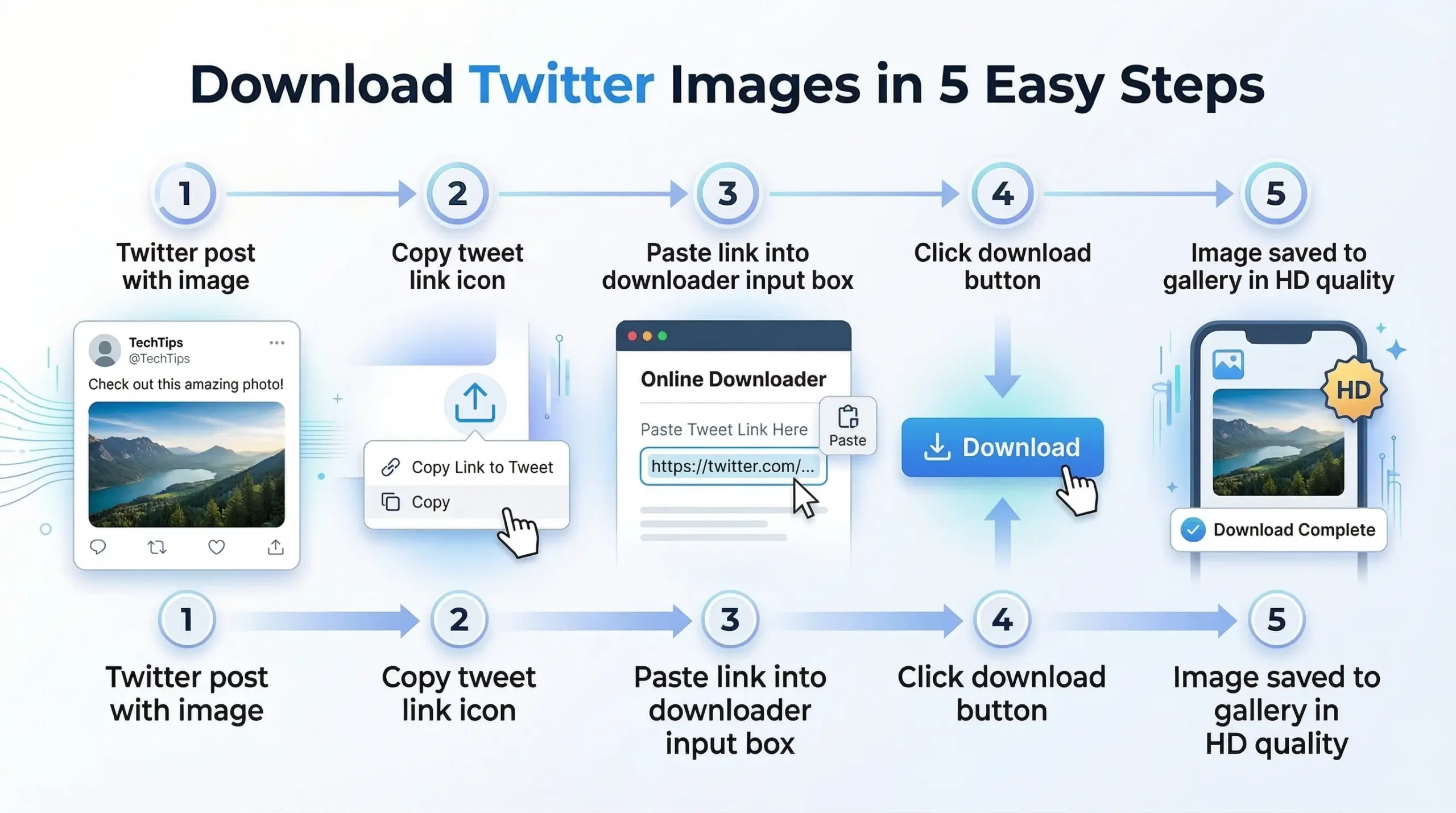
Here is how the process usually works.
Step 1: Find the Tweet With the Image
Open Twitter and locate the tweet containing the image you want to download.
Make sure the tweet is public.
Private tweets cannot be accessed by download tools.
Step 2: Copy the Tweet Link
Click the Share icon under the tweet.
Then select Copy link to tweet.
This copies the tweet URL to your clipboard.
Example format:
https://twitter.com/username/status/123456789
Step 3: Open a Twitter Image Downloader
Next, open twitter photo downloader in your browser.
Online tools designed for this purpose like TweeterDownloader.com analyze the tweet link and extract images.
Step 4: Paste the Tweet Link
Paste the copied tweet URL into the downloader input box.
Then click the Download button.
The tool will scan the tweet and detect the images.
Step 5: Download the Image
After processing the link, the tool will display the images available in that tweet.
You can then download the highest resolution version.
This method is simple and works on mobile phones, tablets, and desktop computers.
Tips for Getting the Highest Image Quality
If you want to download Twitter images in original quality, a few simple tips can help.
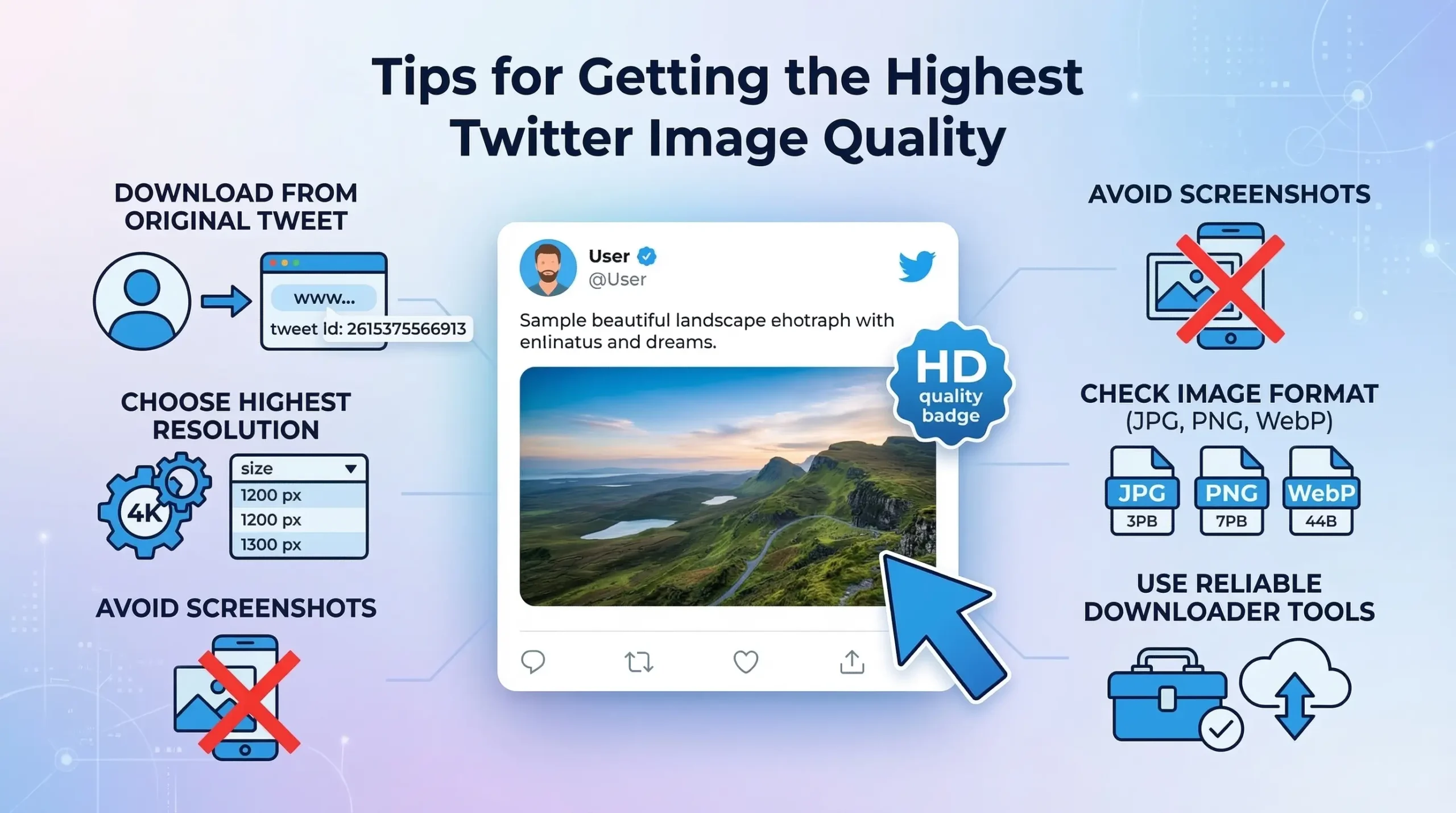
Download From the Original Tweet
Sometimes images are reposted or quoted in other tweets.
Downloading from the original tweet usually provides better quality.
Choose the Highest Resolution Option
Some download tools offer multiple image sizes.
Always select the highest resolution available.
Avoid Screenshotting Images
Screenshots reduce image quality and resolution.
Downloading the image file directly preserves the original quality.
Check the File Format
Twitter images are usually stored as:
- JPG
- PNG
- WebP
PNG files usually provide better detail for graphics and text.
Use Reliable Download Tools
Some tools compress images again during download.
Choose tools that retrieve the image directly from Twitter servers.
Common Mistakes When Saving Twitter Images
Many users unknowingly reduce image quality when saving images.
Here are common mistakes to avoid.
Using Screenshots Instead of Downloads
Screenshots capture only what appears on the screen.
This reduces resolution and detail.
Saving the Preview Image
Sometimes users accidentally save the preview thumbnail instead of the full image.
Always open the image before saving.
Downloading From Reposted Tweets
Reposts may contain already compressed versions.
Downloading from the original source is better.
Using Untrusted Tools
Some download tools reduce quality or add watermarks.
Choose tools that preserve original files.
Ignoring Image Format
Some formats are better suited for certain types of images.
For example:
- PNG works well for graphics
- JPG works well for photos
Understanding formats can help maintain quality.
Frequently Asked Questions
Yes. Twitter stores high resolution versions of many images. TweeterDownloader tool allows you to download the highest available quality.
This usually happens because the downloaded version is compressed. Twitter often displays lower resolution previews in the timeline.
No. Many tools allow you to download Twitter images online directly from your browser.
Yes. Tweets can contain up to four images. This tool typically detect all images and allow you to save each one.
Downloading the original image file using TweeterDownloader.com does not reduce quality. However, screenshots or compressed downloads may reduce resolution.
No. Our TweeterDownloader Tool only works with public tweets.
Final verdict:
Twitter compresses images for faster loading, which means the version you see in your feed may not always be the highest resolution available.
To download Twitter images in original quality, it is important to retrieve the image directly from the tweet source rather than relying on screenshots or compressed previews.
Using the right methods, such as adjusting image URLs or using a twitter photo downloader, allows you to access the highest resolution version stored on Twitter.
Whether you are collecting design inspiration, saving photography, or keeping useful references, understanding these techniques can help you save Twitter photos without losing quality.