
Twitter GIF Downloader
Use our Twitter GIF downloader online to download GIF from Twitter quickly. Save X GIFs in high quality for free on any device.
How to Use Twitter GIF Downloader?
Using the Twitter GIF Downloader on TweeterDownloader is simple. You only need the link to the tweet that contains the GIF.
Open Twitter (X) and locate the tweet that contains the GIF you want to download. Click or tap the Share icon under the tweet and choose Copy link to tweet.
Go to our Twitter GIF Downloader tool. Paste the copied tweet link into the box. Make sure the link is complete so the tool can detect the GIF properly.
Click the “Fetch Media” button. The tool will process the tweet and extract the GIF from the media. Once the GIF appears, click Download GIF to save it to your device.
How to Download GIFs from X using TweeterDownloader?
Downloading a GIF from Twitter using TweeterDownloader is simple and takes only a few seconds.
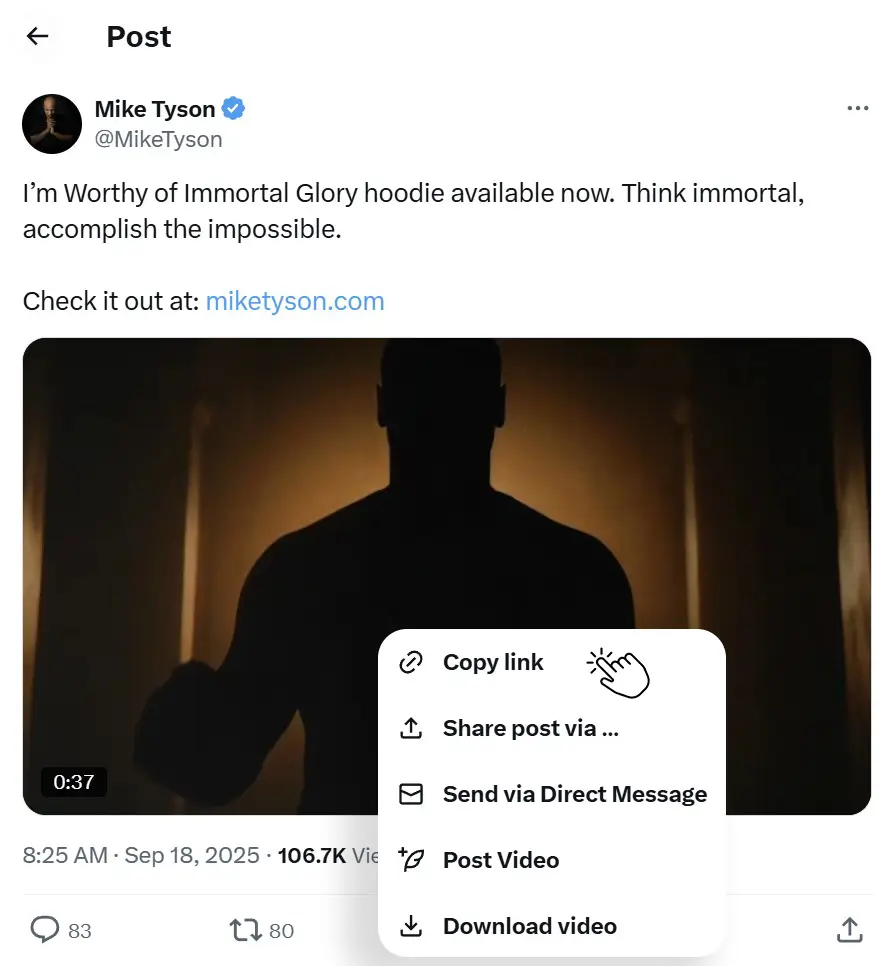
Click Share Icon and Copy Link
Open Twitter (X) and find the tweet that contains the GIF you want to download.
Click the Share button and copy the tweet URL.
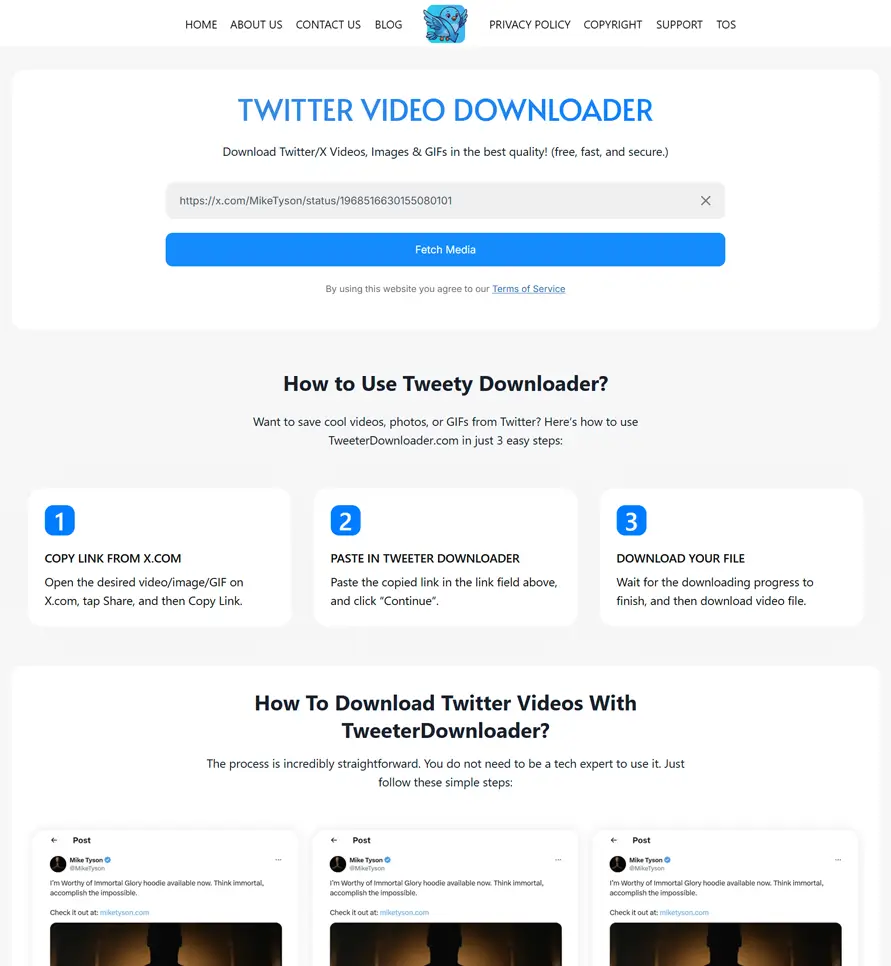
Paste URL and Click “Fetch Media”
Visit TweeterDownloader.com and paste the copied tweet link (which contains gif) into the download box on the page.

Download the Photo/Image
Click the “Fetch Media” button. The tool will process the tweet and generate the downloadable GIF file instantly.
Frequently Asked Questions
Here are some common questions people ask when using a Twitter GIF Downloader. These answers will help you understand how the tool works, what types of GIFs you can download, and how to save Twitter GIFs easily on different devices.
Why Choose TweeterDownloader?
There are many websites that claim to help users download GIF from Twitter, but not all of them offer a smooth experience.
TweeterDownloader focuses on reliability and simplicity.
Here are some reasons users prefer this tool.
- Clean and minimal interface
- Fast download processing
- Supports multiple media types including GIFs, images, and videos
- Works on both mobile and desktop browsers
- No registration or login required
These advantages make TweeterDownloader a convenient solution for anyone looking to download GIFs from Twitter quickly.
Clean User Interface
Many downloader websites are filled with popups or confusing layouts. TweeterDownloader keeps the interface clean and easy to navigate.
Quick Media Detection
The tool processes tweet links quickly and detects GIFs without unnecessary steps.
Consistent Performance
TweeterDownloader is designed to work with most public tweets containing GIFs.
No Account Required
You do not need to sign in or provide personal information.
Designed for Real Users
The downloader was built to solve a common problem people face when saving Twitter media.
Instead of complicated workflows, the tool focuses on a quick three step process.
Supported Devices
One of the best things about this Twitter GIF downloader online tool is that it works across multiple devices.
You can use it from almost any modern device with a web browser.
✅ Android Phones:
Android users can download GIFs using browsers like Chrome or Firefox.
Steps are simple.
- Copy tweet link
- Paste it into the downloader
- Download the GIF
The GIF will be saved to the phone storage or downloads folder.
✅ iPhone and iPad:
The downloader works smoothly on iOS devices using Safari or other browsers.
Downloaded GIFs can be accessed through the Files app or photo library depending on browser settings.
✅ Windows Computers:
Windows users can use TweeterDownloader from browsers such as Chrome, Edge, or Firefox.
Files will usually appear in the Downloads folder.
✅ Mac Computers:
Mac users can download Twitter GIFs using Safari or Chrome.
Downloaded GIFs are saved to the Downloads folder by default.
✅ Tablets:
The downloader also works on tablets including Android tablets and iPads. The layout adjusts automatically for different screen sizes.
What Makes our Image GIF Different?
Many tools allow you to download GIFs from Twitter, but not all of them provide a smooth and reliable experience. TweeterDownloader focuses on simplicity, speed, and quality so users can save Twitter GIFs without hassle.
Here is what makes our Twitter GIF Downloader different.
- Fast processing: GIFs are detected and prepared for download within seconds.
- High quality downloads: The tool retrieves the best available media quality from the tweet.
- No login required: You can download Twitter GIFs without creating an account.
- Works on all devices: Compatible with Android, iPhone, Windows, Mac, and tablets.
- Clean and simple interface: The tool is easy to use even for first time visitors.
- Free to use: No hidden fees or subscriptions.
TweeterDownloader is designed to make the process of downloading GIFs from Twitter quick, simple, and reliable for everyone.
✅ Instant Access
You can access the tool anytime using a web browser. No installation or setup is required.
✅ Works Anywhere
Because the tool is web based, it works on mobile phones, laptops, desktops, and tablets.
✅ Faster Workflow
The download process only requires a tweet link. This keeps the workflow quick and simple.
✅ Always Updated
Online tools are easier to maintain and update. This helps ensure compatibility with Twitter media formats.
✅ Saves Storage Space
You do not need to install extra apps that take up storage space on your device.
✅ No Personal Data Required
The downloader does not require login or personal information.
✅ Temporary Processing
Tweet links are processed temporarily to retrieve media. The system does not store your downloads.
Key Features of this Twitter GIF Downloader:
TweeterDownloader focuses on simplicity and performance. The tool is designed to provide a smooth experience for anyone who wants to download Twitter GIFs.
Here are the key features mentioned below:
✅ Fast GIF Processing
The downloader retrieves the GIF from the tweet quickly. Most downloads are ready in just a few seconds.
✅ Works With Tweet Links
The downloader only requires a tweet URL. Once pasted into the tool, it automatically detects the GIF.
✅ No Software Installation
You do not need to install any apps or browser extensions. Everything works directly online.
✅ Easy to Use
The interface is simple. Even first time users can download GIFs without any confusion.
✅ High Quality Downloads
The tool extracts the GIF media in the highest quality available from the tweet.
✅ No Software Installation
You do not need to install any apps or browser extensions. Everything works directly online.
✅ Safe and Private
The system does not store downloaded media or personal data.