
Twitter Image Downloader
Download Twitter photos easily with our Twitter image download online tool. Save high quality X images instantly. Free, fast and compatible with all devices.



How to Use Twitter Image Downloader?
Downloading Twitter photos using this tool takes less than a minute. The process is simple and works the same on mobile and desktop.
Open Twitter or X and find the tweet that contains the image, Click the Share icon and choose Copy link to tweet.
Paste the copied tweet link into the download box. Press the Download button.
You will see the available images from the tweet. Click the “Download Image” button to save the image to your device.
How to Download Images from Twitter using TweeterDownloader?
To download images from Twitter using TweeterDownloader, simply copy the tweet URL, paste it into the downloader field on the website, and press the download button. The tool will process the tweet and provide the images ready to save.
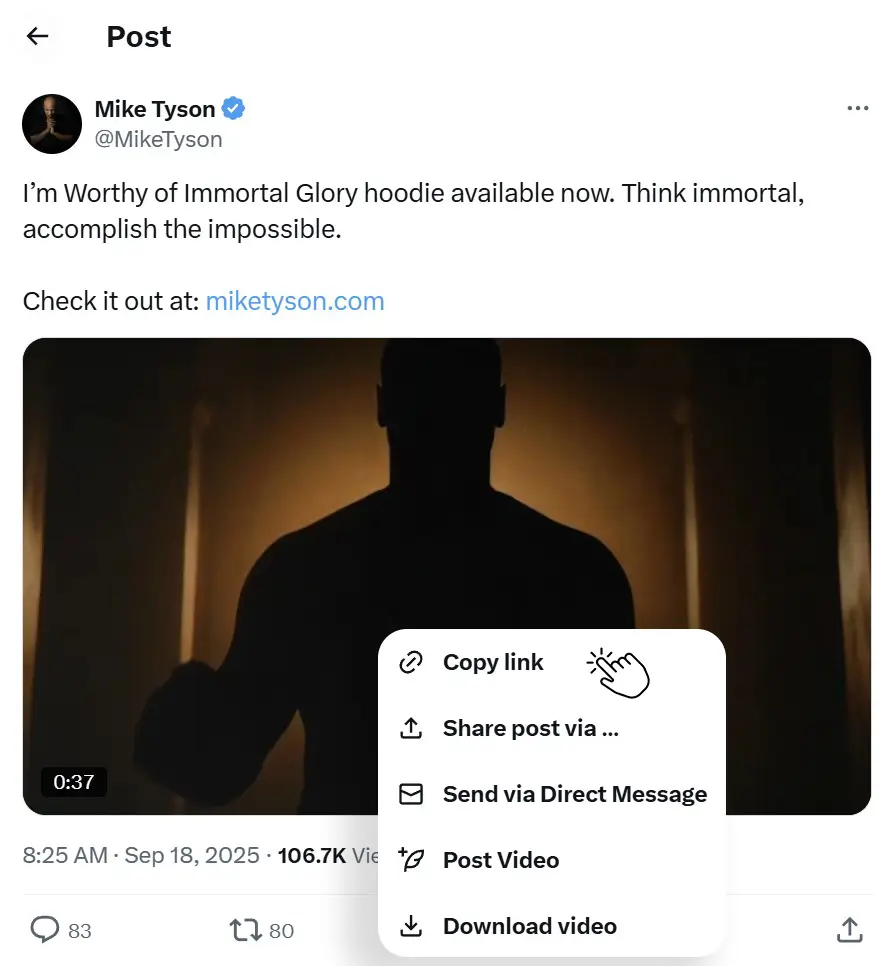
Click Share Icon and Copy Link
Open Twitter or X and find the tweet that contains the images.
Tap the Share icon and select Copy link to tweet.

Paste URL and Click “Fetch Media”
Go to tweeterdownloader.com and paste the copied tweet link into the download box of the Twitter Image Downloader. Click the “Fetch Media” button.

Download the Photo/Image
The tool will process the tweet and detect all images available in that post. You will see the available images. Click the Download button to save the image to your device.
Why Use Our Twitter GIF Downloader vs Others?
Downloading GIFs from Twitter can be tricky because Twitter converts GIFs to MP4 videos. Here’s why our dedicated GIF Downloader is the best choice:
| Feature | TweeterDownloader ⭐ | SSSTwitter | SaveTwitter | TWDown | TwitterVideoDownloader |
|---|---|---|---|---|---|
| Dedicated GIF Downloader Tool | ✅ Yes (Separate Page) | ❌ No | ⚠️ Basic | ❌ No | ❌ No |
| Download GIFs in High Quality | ✅ Best Quality Available | ⚠️ Mixed with Videos | ✅ Yes | ❌ No GIF Support | ⚠️ Limited |
| Automatic GIF Detection from Tweet | ✅ Auto-Detects GIFs | ⚠️ Manual | ✅ Yes | ❌ No | ⚠️ Manual |
| Download GIF as MP4 (Twitter Native) | ✅ Yes | ✅ Yes | ✅ Yes | ❌ No | ✅ Yes |
| No Annoying Ads or Pop-ups | ✅ Zero Ads | ❌ Has Ads | ❌ Has Ads | ❌ Has Ads | ❌ Has Ads |
| Clean & Simple Interface | ✅ Modern & Minimal | ⚠️ Cluttered | ⚠️ Cluttered | ⚠️ Outdated | ⚠️ Outdated |
| Works on iPhone & Android | ✅ Fully Responsive | ✅ Yes | ✅ Yes | ✅ Yes | ✅ Yes |
| Also Download Videos & Images | ✅ All 3 (Video + Image + GIF) | ⚠️ Video + GIF Only | ✅ All 3 | ⚠️ Video Only | ⚠️ Video + GIF |
| Download Thumbnails / Cover Photos | ✅ Yes (Exclusive) | ❌ No | ❌ No | ❌ No | ❌ No |
| Browser Extension Available | ✅ Chrome, Firefox & Edge | ❌ No | ❌ No | ❌ No | ❌ No |
| No Login / Signup | ✅ Never | ✅ No | ✅ No | ✅ No | ✅ No |
| Privacy (No Tracking) | ✅ 100% Private | ⚠️ Uses Cookies | ⚠️ Uses Cookies | ⚠️ Uses Cookies | ⚠️ Uses Cookies |
| Unlimited Downloads | ✅ Unlimited | ✅ Yes (with delay) | ✅ Yes | ✅ Yes | ✅ Yes |
| 100% Free | ✅ Always Free | ✅ Free | ✅ Free | ✅ Free | ✅ Free |
While most tools treat GIFs as an afterthought, TweeterDownloader has a dedicated GIF Downloader that auto-detects GIF content from tweets. Combined with our ad-free experience, browser extension, and exclusive Thumbnail Downloader, we offer the most complete Twitter media downloading solution available.
Frequently Asked Questions
Got questions? We’ve got answers! Here are some of the most common things people ask about our Twitter downloader tool. If you don’t see what you’re looking for, feel free to reach out to us directly!
Why Use This Twitter Image Downloader?
Many users search for tools to download images from Twitter, unfortunately no tools available on the internet which gave this facility, some websites are available but they are slow, cluttered with ads, or limit download quality.
But this tool focuses on providing a better experience for FREE (No Login Required).
Reliable Download Method
The downloader extracts media directly from the tweet link. This reduces errors and improves success rates.
No Watermarks
Downloaded images remain exactly as they appear on Twitter. The tool does not add watermarks or branding.
Quick Access From Any Browser
You can use the tool from any modern browser such as Chrome, Safari, Edge, or Firefox.
Optimized for Speed
The system processes requests quickly so you spend less time waiting.
Designed for Real Users
This tool was built for people who regularly save Twitter images. The workflow is simple and avoids unnecessary steps.
Compared with many other Twitter photo downloader tools, this one focuses on the essentials.
What Makes our Image Downloader Different?
Many websites reduce image quality when downloading Twitter media.
This tool focuses on providing the highest quality version available.
Original quality images are useful because:
- Details remain sharp
- Colors stay accurate
- Images look better in presentations
- Photos can be reused for design work
If the tweet contains a high resolution image, the downloader retrieves the best version available.

✅ Safety and Privacy
Trust is important when using online tools. This Twitter image downloader follows simple principles to keep the process safe.
✅ No Account Required
You never need to provide email, password, or personal details.
✅ No Stored Downloads
Images are processed temporarily. The system does not keep copies of downloaded media.
✅ Browser Based Tool
Everything works directly in your browser. No apps or extensions are required.
✅ Secure Connection
The website uses secure HTTPS connections to protect data during processing.
Key Features of This Twitter Photo Downloader:
Many Twitter download tools exist online, but not all provide a smooth experience. This tool focuses on speed, quality, and simplicity.
Here are the main features:
✅ Fast Image Processing
The tool retrieves images from Twitter instantly. Most downloads are ready in just a few seconds.
✅ Original Image Quality
Images are extracted directly from the tweet source. This helps you download Twitter photos in original quality without compression.
✅ No Login Required
You do not need to sign in or create an account. Just paste the tweet link and download.
✅ Free to Use
The tool is completely free. There are no hidden fees or subscription plans.
✅ Works With Multiple Images
If a tweet contains several photos, the tool detects and displays all of them so you can download each image separately.
✅ Clean and Simple Interface
The interface is designed to be easy for everyone. Even first time users can understand the process immediately.
✅ Secure and Private
The downloader does not store your downloads or personal information.
Still have questions or need help?
Please contact us. We will reply to your message as quickly as possible.