Twitter (now X) is arguably the fastest moving social media platform on the internet. Every single minute, thousands of videos, viral memes, breaking news clips, and educational threads are uploaded.
For average users, simply liking or bookmarking a tweet is enough. But what if you need those files on your hard drive?
Whether you are a video editor putting together a compilation, a marketer collecting assets, or just someone who loves archiving internet history, you have probably faced the same frustrating problem. You find a great thread with ten different videos.
To save them, you have to copy the first link, open a downloader website, paste the link, click download, wait, and then repeat this exact boring process nine more times.
It is a massive waste of time.

The internet moves fast, and your workflow should be just as fast. This is exactly where our exclusive Twitter bulk video downloader comes into play.
In this comprehensive guide about how you can download twitter videos in bulk, we are going to look at why downloading media one by one is an outdated method, who actually benefits from bulk downloading, and how you can speed up your digital life using the right tools.
The Problem with Regular Video Downloaders
To understand the value of our bulk downloader, we first have to look at the limitations of standard tools.
If you search for a Twitter video saver online, you will find hundreds and may be throusands of results. Almost all of x downloaders use the exact same basic logic. They offer a single text box. You put one URL in, and you get one video out.
This is perfectly fine if your friend sent you a funny clip and you just want to save it to your phone gallery. However, the internet has changed. Content on X is no longer just single isolated tweets. Creators post massive threads known as “mega threads” containing multiple videos, infographics, and GIF animations.
When you use a standard downloader tool for a thread containing 15 videos, you are forcing yourself into a repetitive cycle. Not only does this drain your time and energy, but it also clutters your computer.
Every file downloads independently, often with confusing names composed of random numbers. Sorting through them later becomes a completely new headache.
What is a Bulk Twitter Video Downloader?

A bulk downloader is a specialized web tool built for efficiency. Instead of processing a single link, it allows you to input a list of multiple URLs (Currently upto 10 URLs) at the exact same time.
If we talk about its logic which we used at backend, the tool talks to the Twitter servers, locates the media for every single link you provided, and presents all of them to you on a single dashboard.
The most powerful feature of a true bulk downloader is the ability to compress all those fetched files into a single ZIP archive. You click one button, and your browser downloads a neat little package containing all your videos and photos. It turns a thirty minute chore into a five second task.
Real Life Use Cases: Who Needs to Download in Bulk?
You might be wondering if you actually need a tool like this. While anyone can use it, certain groups of people find it absolutely essential for their daily work.

1. Social Media Managers and Marketers
If you run social media accounts for a brand, part of your job involves trend spotting and competitor analysis. Sometimes you need to download a competitor’s entire video campaign to analyze their marketing strategy.
Or perhaps your own brand ran a successful hashtag campaign and you need to collect all the user generated videos to make a “thank you” compilation. A bulk tool lets you paste all those URLs and secure the raw files instantly.
2. Video Editors and Meme Curators
Look at platforms like YouTube Shorts, Instagram Reels, or TikTok. A massive portion of their content consists of reaction videos, meme compilations, or commentary. Video editors need raw materials to work with. If a YouTuber is making a video about a trending topic on X, their editor needs high quality clips of the event.
Instead of downloading clips individually, an editor can grab up to 10 links at the time of publishing this guide, fetch them all, and drop the extracted ZIP file right into their editing software folder.
3. Digital Journalists and Researchers
News breaks on X faster than anywhere else. For journalists, preserving digital evidence is crucial because tweets can be deleted in an instant by the author. If a major event occurs and citizens are uploading ground zero videos, researchers need to archive those clips immediately.
Bulk processing ensures they do not miss crucial footage while wasting time processing links one by one.
4. Personal Archivers
Sometimes you just find a thread of beautiful wallpapers, aesthetic videos, or cooking recipes that you know you will want to look at later. Platforms can crash, accounts get banned, and servers go down. Personal archivers use bulk tools to secure their favorite digital memories safely on their own local hard drives.
How to Safely Download Multiple X Videos at Once in 2026
Using a bulk tool might sound technical, but modern online tool like TweeterDownloader.com made it incredibly simple. If you are using our dedicated bulk downloader, the process is smooth and requires zero technical knowledge.
Step 1: Gather Your Links:
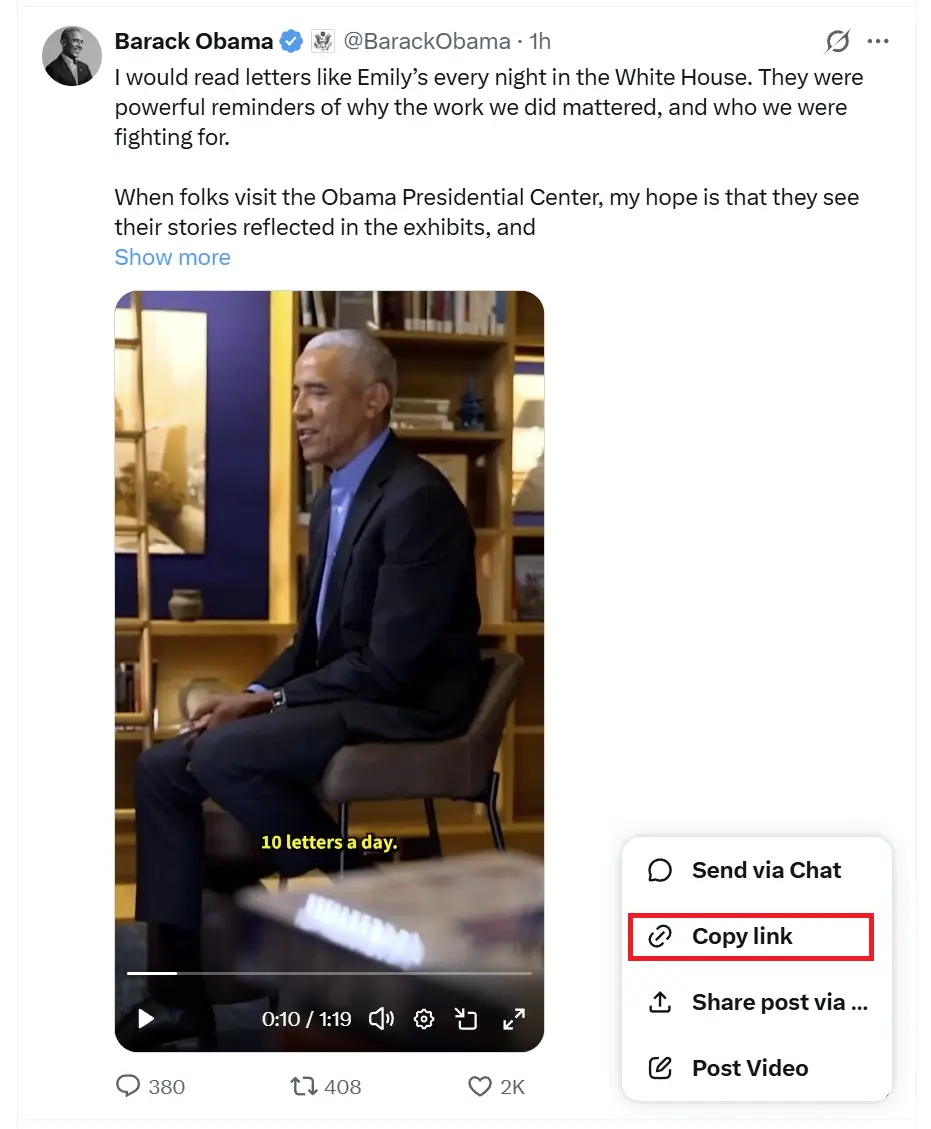
First, open X and find the videos, images, or GIFs you want to save. Click the share button on each tweet and copy the link. You can paste these links temporarily into a notepad if you are collecting a lot of them. (In future we will add the functionality of upload a notepad file containing twitter threads URLs)

Step 2: Paste and Fetch:
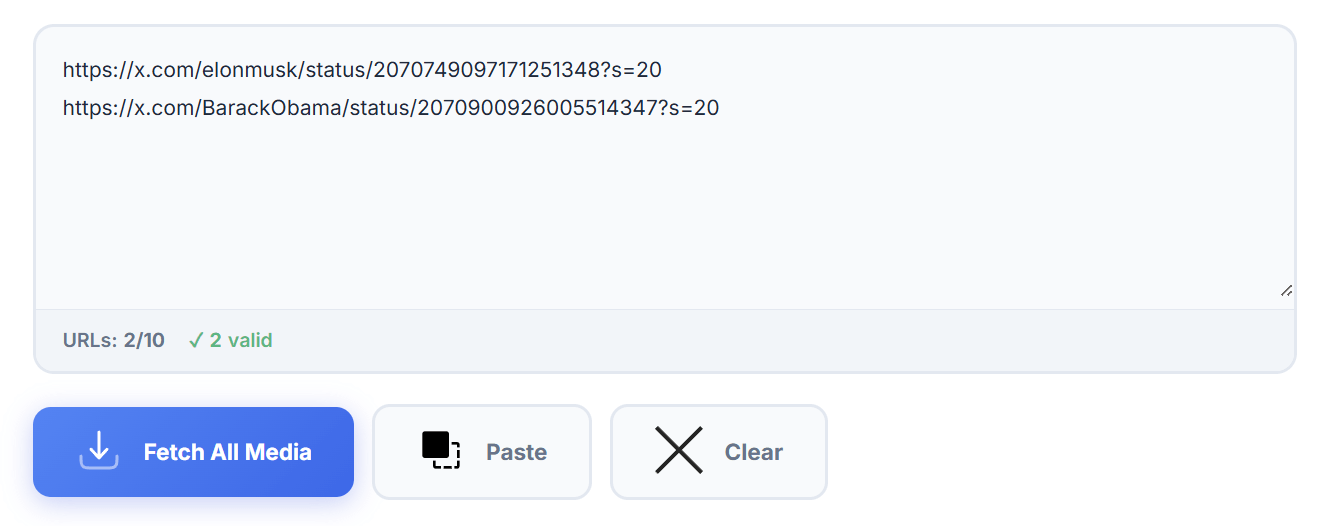
Open our bulk downloader page. You will see a large text area. Paste all your collected URLs here. Make sure there is only one link per line so the tool can read them properly. Once you are ready, click the fetch button.
Step 3: Choose Quality and Download:
The tool will instantly generate visual preview cards for every link you provided. Here, you have total control. If you want to save data, you can choose a smaller resolution. If you need crisp quality for a project, select the Original or Large format.
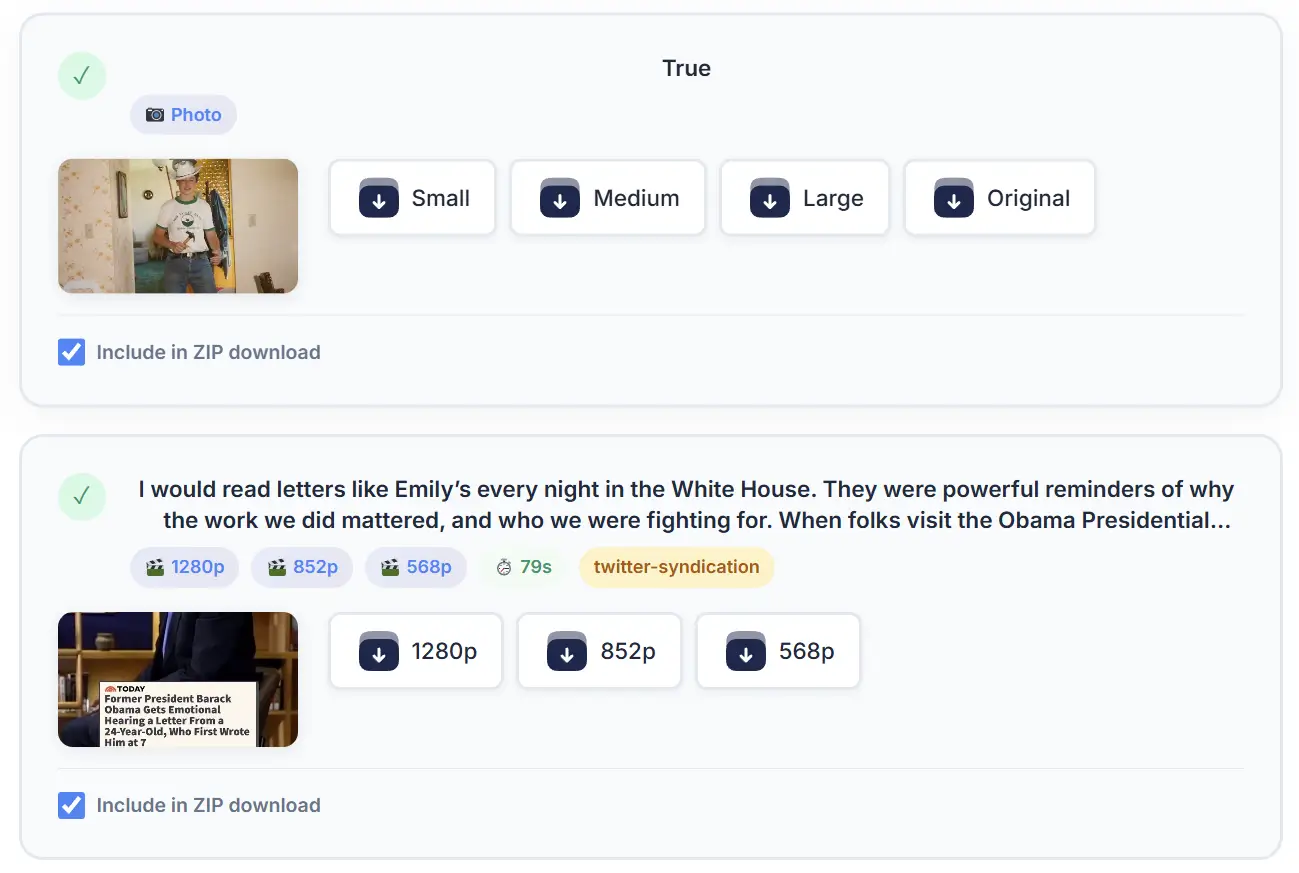
Step 4: The Magic of ZIP:
You can download files individually by clicking on them, but the smartest way is to use the ZIP generation feature. Just click the Generate ZIP button. The tool will bundle all your selected media into one file and send it to your downloads folder.

Why Downloading in ZIP Format Changes Everything
We have mentioned ZIP files a few times, but why are they so important?
When you download ten videos normally, they scatter across your downloads folder. They mix with your PDF documents, your software installers, and your personal photos. Finding them later requires sorting by date and renaming them manually.
A ZIP file solves this problem. It acts as a digital briefcase. All your downloaded Twitter videos are placed safely inside this briefcase. When you open it on your computer or mobile phone, all your media is neatly grouped together in one single folder. It keeps your device clean and makes file management extremely easy.
Final Thoughts
The way we consume and store digital content is constantly evolving. As social media platforms become more packed with high quality media, our tools need to adapt to keep up with the pace.
Downloading a single video is easy, but managing bulk media requires a smart approach. By using a dedicated bulk downloader, you are not just downloading files. You are optimizing your workflow, keeping your hard drive organized, and saving hours of repetitive clicking.
Whether you are a professional content creator building your next viral video, or just someone saving a thread of funny cat clips, making the switch to a bulk and ZIP supported downloader is the best digital upgrade you can make today.