
Twitter Ads Downloader
Download Twitter/X Ad Videos Instantly — Free, Fast & Private



How to Download a Twitter Ad Video (Step by Step)
It’s a 3-step process. Same as any other Twitter video. Here’s exactly what to do:
Step 1: Copy the Link of the Promoted Tweet
Open Twitter (X) on your phone or computer.
Scroll through your feed until you find the promoted tweet with the video you want to download. You’ll know it’s an ad because you’ll see a small “Promoted” label at the bottom-left of the tweet.
Now:
- On mobile: Tap the Share icon (arrow) below the tweet → Tap “Copy Link”
- On desktop: Click the three dots (···) on the tweet → Click “Copy link to Tweet”
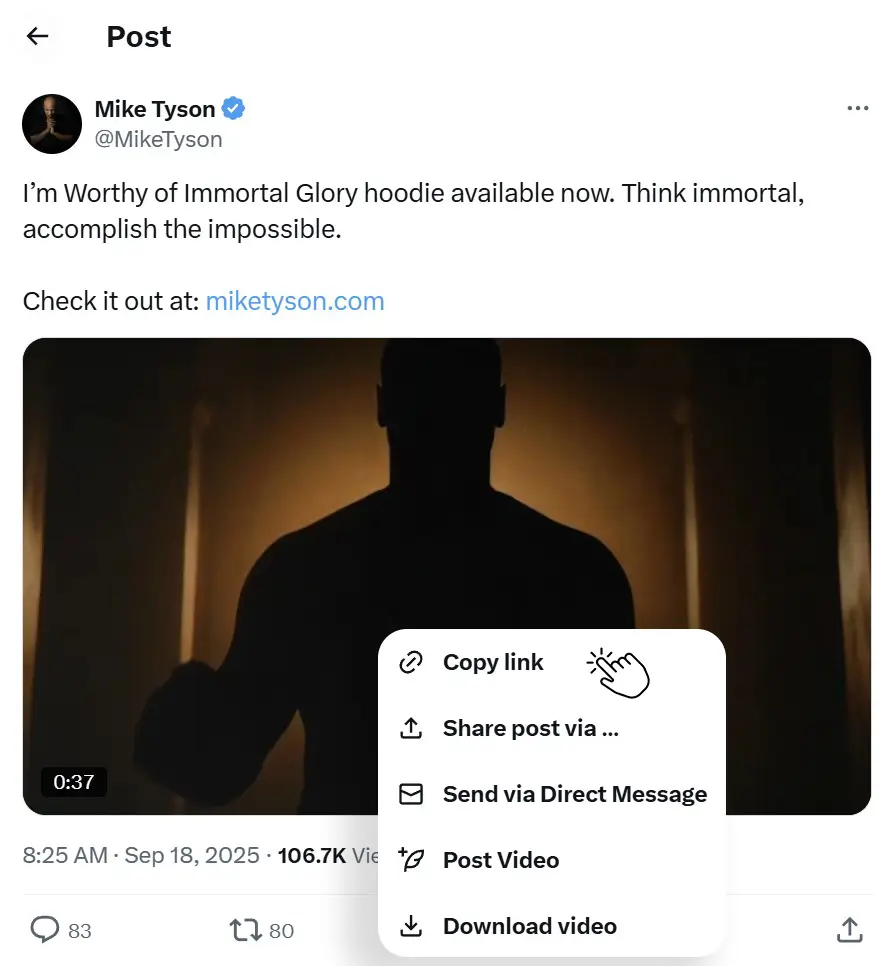
Quick note: The link should look like this:
https://x.com/username/status/1234567890123If it looks like this, you’re good. If it looks like something else (like a shortenedt.colink), that works too. Our tool handles both.
Step 2: Paste the Link into TweeterDownloader
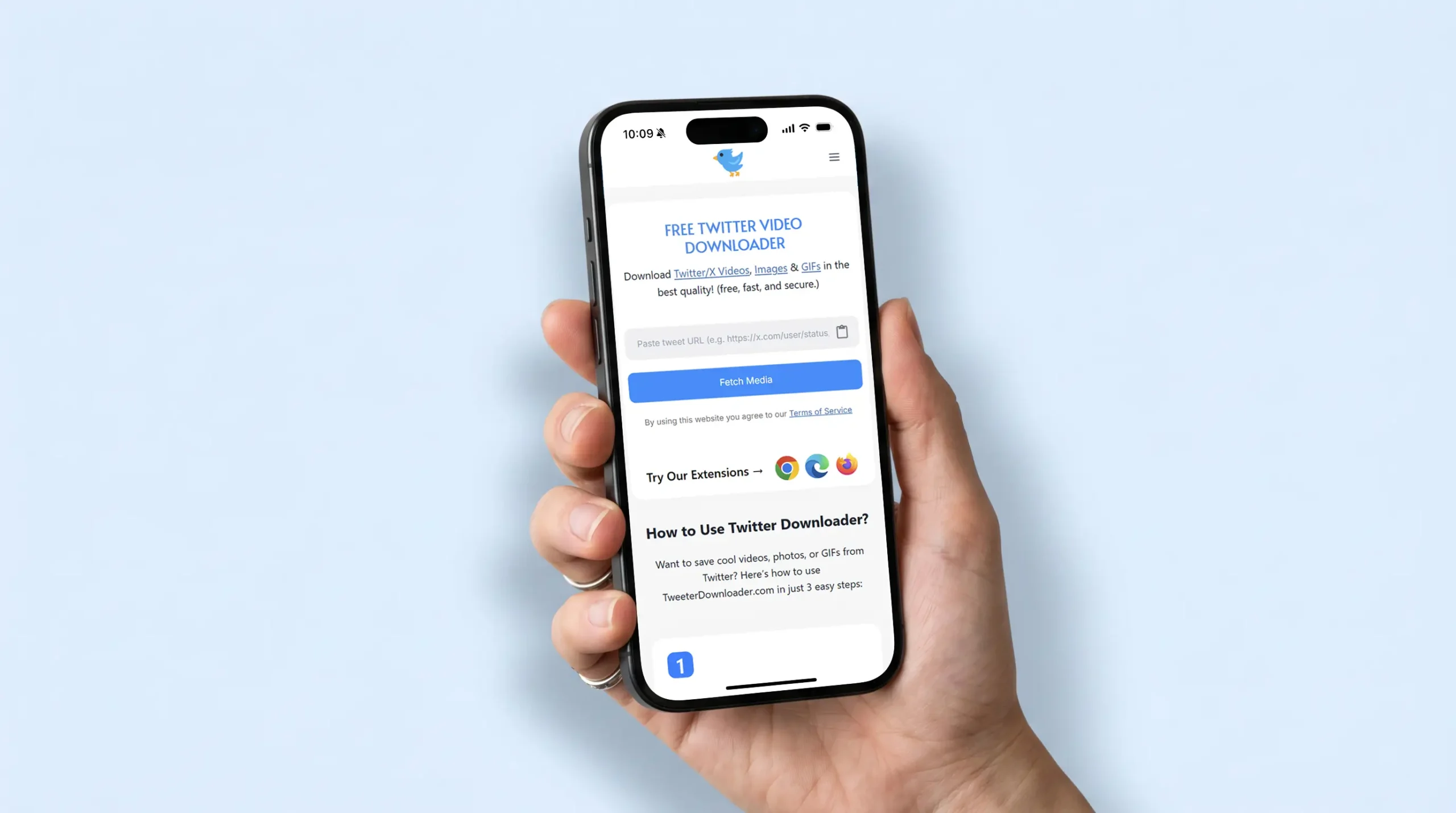
Come back to this page. You’ll see the input box at the top.
Tap or click inside the box. Paste the tweet link you just copied.
Then click the “Fetch Media” button.
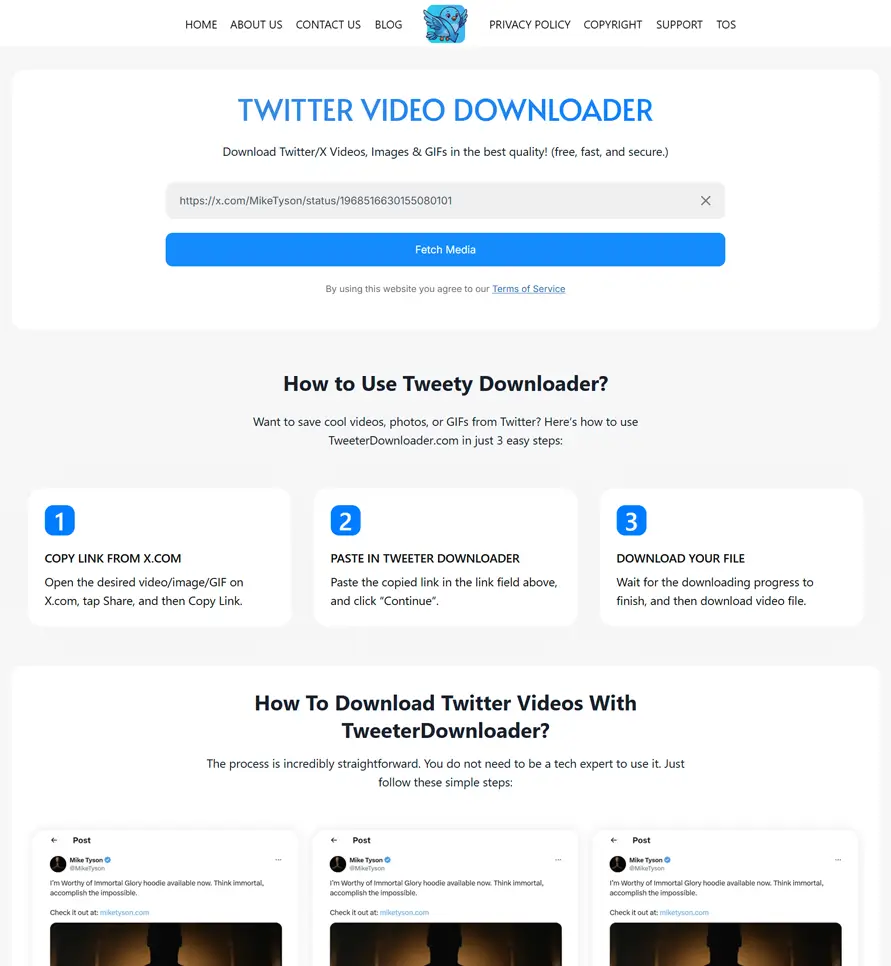
Wait about 5–10 seconds. Our tool processes the tweet and finds the video file.
Step 3: Choose Your Quality and Download
Once the video loads, you’ll see:
- A preview thumbnail of the video
- Quality options — usually 360p, 720p, 1080p and1440p
Choose the quality you want and click Download. The video file saves directly to your device — no extra steps, no extra software.
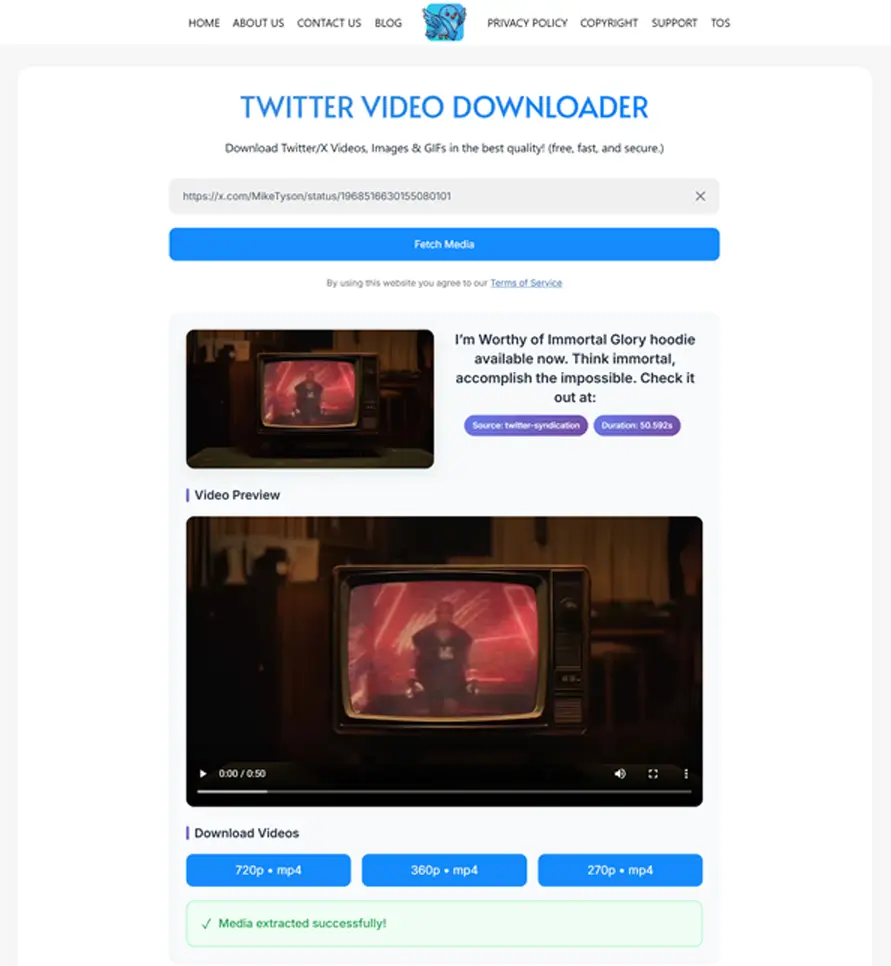
That’s it. Done in under 60 seconds.
What Types of Twitter Ads Can You Download?
Twitter runs several types of promoted content. Here’s what our tool can handle:
| Ad Type | Can Download? | Notes |
|---|---|---|
| Promoted Video Tweets | ✅ Yes | Standard video ads — works perfectly |
| Promoted Tweets with Images | ✅ Yes | Use our Image Downloader instead |
| Promoted GIFs | ✅ Yes | Saved as MP4 (how Twitter stores GIFs) |
| Video Card Ads (with CTA button) | ✅ Yes | Downloads the video portion |
| Promoted Moments | ⚠️ Partial | Individual tweets within Moments can be downloaded |
| Pre-roll Ads (before other videos) | ❌ No | These aren’t attached to a tweet URL |
| Private / Targeted Ads | ❌ No | Only publicly accessible promoted tweets work |
Everything You Need to Save Twitter Ad Videos
Built for marketers, researchers, and everyday users who want clean, fast downloads every time.
Works on Promoted Tweets
Our tool is specifically tested with Twitter/X ad creatives and sponsored posts, not just regular videos.
Ad-ReadyHD Quality Downloads
Download ad videos in up to 1440p HD quality. No compression. No quality loss. The exact file Twitter stores on their servers.
Up to 1440pZero Watermarks
Unlike other tools, we never stamp our branding on your downloaded video. What you download is clean and original.
100% CleanNo Login. No Tracking.
We don’t ask for your Twitter account, email, or any personal information. Paste a link and get your file. That’s it.
PrivateWorks on All Devices
iPhone, Android, Windows, Mac, tablet — it doesn’t matter. If you have a browser, you have our tool. No app needed.
All PlatformsUltra Fast (Results in Seconds)
Paste the link and click Fetch. Most ad videos are detected and ready to download in 5 to 10 seconds. No waiting around.
InstantTweeterDownloader vs Other Tools
Most people try to use a general Twitter video downloader for ads and that sometimes works, but not always. Here’s how we compare:
| Feature | TweeterDownloader ⭐ | Generic Downloaders | Browser Inspect Method |
|---|---|---|---|
| Works with Promoted Tweets | ✅ Yes | ⚠️ Sometimes | ⚠️ Sometimes |
| Works with Regular Tweets | ✅ Yes | ✅ Yes | ✅ Yes |
| HD Quality (1080p) | ✅ Yes | ✅ Yes | ⚠️ Depends |
| No Watermark | ✅ Yes | ✅ Yes | ✅ Yes |
| No Ads or Pop-ups | ✅ Zero Ads | ❌ Heavy Ads | ✅ Yes |
| Works on Mobile (iPhone/Android) | ✅ Yes | ⚠️ Often Broken | ❌ Desktop Only |
| Browser Extension Available | ✅ Chrome, Firefox, Edge | ❌ No | ❌ No |
| No Login Required | ✅ Never | ✅ Usually | ✅ Yes |
| Image Downloading | ✅ Yes (Dedicated Tool) | ❌ Rarely | ❌ No |
| GIF Downloading | ✅ Yes (Dedicated Tool) | ⚠️ Sometimes | ❌ No |
| Thumbnail Downloading | ✅ Yes (Exclusive) | ❌ No | ❌ No |
| Speed | ⚡ Fast (5–10 seconds) | 🔄 Variable | 🔄 Slow |
| 100% Free | ✅ Always | ✅ Free | ✅ Free |
Frequently Asked Questions
Got questions? We’ve got answers! Here are some of the most common things people ask about our Twitter downloader tool. If you don’t see what you’re looking for, feel free to reach out to us directly!
Helpful Articles
What is a Twitter Ads Downloader?
A Twitter Ads Downloader is a web-based tool that lets you save video content from promoted or sponsored tweets directly to your device, just like downloading a regular Twitter video.
Normally, Twitter doesn’t give you a “Save” button for any video regular or promoted. And while several tools exist for regular Twitter videos, very few handle ad content properly. That’s because promoted tweets sometimes have slightly different URL structures or load behavior.
Our Twitter Video Downloader is built to handle both regular posts and promoted ad posts without any extra steps from your side.
So whether you want to:
- Save a competitor’s ad for marketing research
- Archive a brand campaign you want to study
- Keep a reference video for your own creative inspiration
- Or just save a cool sponsored video you don’t want to lose
Our tool does it in under few seconds usually 3-5 seconds.
Who Uses a Twitter Ad Downloader And Why?
You might be wondering — who actually needs to download Twitter ads? Turns out, a lot more people than you’d think.
Digital Marketers & Advertisers 📊
If you run ads on Twitter, or you’re learning how to, studying what other brands are doing is invaluable. Saving competitor ads lets you:
- Build a swipe file of high-performing creatives
- Analyze what formats, hooks, and CTAs competitors use
- Study the video length, pacing, and messaging that gets engagement
- Keep a reference library for your next campaign brainstorm
A saved video file is so much easier to review, share with your team, or present in a meeting than scrambling to find a tweet again.
Content Creators & Influencers 🎬
Brands often run ads featuring content creators. If a brand ran a campaign that featured your content or content in your niche, downloading it lets you:
- Save it as proof of collaboration for your portfolio
- Reference it when pitching future brand deals
- Study the editing style and production quality of brand content
Marketing Students & Researchers 📚
Twitter ads are a goldmine of real-world marketing examples. If you’re:
- Taking a digital marketing course
- Writing a thesis or case study on advertising
- Building a portfolio of ad examples for class
Downloading actual ad videos for study and reference is a completely legitimate use case. Most university marketing programs actually encourage keeping a swipe file of great ads.
A swipe file is basically a personal collection of creative work that inspires you like copywriters, designers, and marketers have used them for decades.
Business Owners & Brand Managers 🏢
If you’re running a business and you want to keep track of:
- A competitor’s latest promotional campaign
- Seasonal ad content from brands in your industry
- Video testimonials or case studies that appeared as promoted content
Having the actual video file (rather than a bookmarked tweet that might disappear) gives you a reliable reference to work from.
Everyday Twitter Users 👤
Sometimes you just see a really cool ad. A funny one. An emotional one. A limited-time brand collaboration you want to remember. There’s nothing wrong with saving content that genuinely interested you, as long as it’s for personal use.
Why Professionals Trust TweeterDownloader for Ad Videos
From solo marketers to brand teams — here’s what makes our Twitter Ads Downloader the smarter choice.
Handles Ad-Specific URLs
Promoted tweets sometimes behave differently from regular posts. Our tool is built and tested specifically to handle X ad URLs without errors or failed downloads.
Multiple Quality Options
Need a small file for a quick reference? Or the full 1080p version for your swipe file? We give you every available quality option, you choose what fits your need.
No Pop-ups. No Redirect Ads.
Every other downloader bombards you with ads and fake “Download” buttons. We don’t. You click once and get your file. Clean experience, every single time.
Browser Extension Available
Frequently downloading Twitter ads for research? Install our browser extension for Chrome, Firefox, or Edge. A download button appears directly on every tweet, no copy-pasting needed.
Download Images & GIFs Too
Twitter ads aren’t always videos. If the promoted post contains an image or a GIF, our sister tools handle those formats just as easily with same simple process.
Completely Free (No Limits)
No daily cap. No premium tier. No “you’ve hit your free limit” messages. Download as many ad videos as you need for your research or swipe file, without paying a cent.
No Software Installation
Everything runs inside your browser. There’s nothing to download, install, or update. Works the same whether you’re on Windows, Mac, iPhone, or Android.
Your Data Stays Private
We don’t log what links you paste, we don’t store downloaded files, and we don’t share your activity with third parties. Your research stays completely private.
Works Instantly (24/7)
No accounts to verify. No delays. No maintenance windows. The tool is available around the clock, download an ad video at 3am if you need to. We’re always on.
Ready to Download Your First Twitter Ad Video?
It takes less than 60 seconds. Paste the link above, click Fetch Media, and your file is ready.
↑ Try It Now — It’s Free